한 줄 요약: Understand Anything은 코드베이스, 문서, 위키를 분석해 파일·함수·클래스·의존성·도메인 흐름을 지식 그래프 JSON으로 만들고, 이를 대시보드·질의응답·Diff 분석·온보딩 투어로 연결하는 TypeScript 기반 오픈소스 프로젝트다.
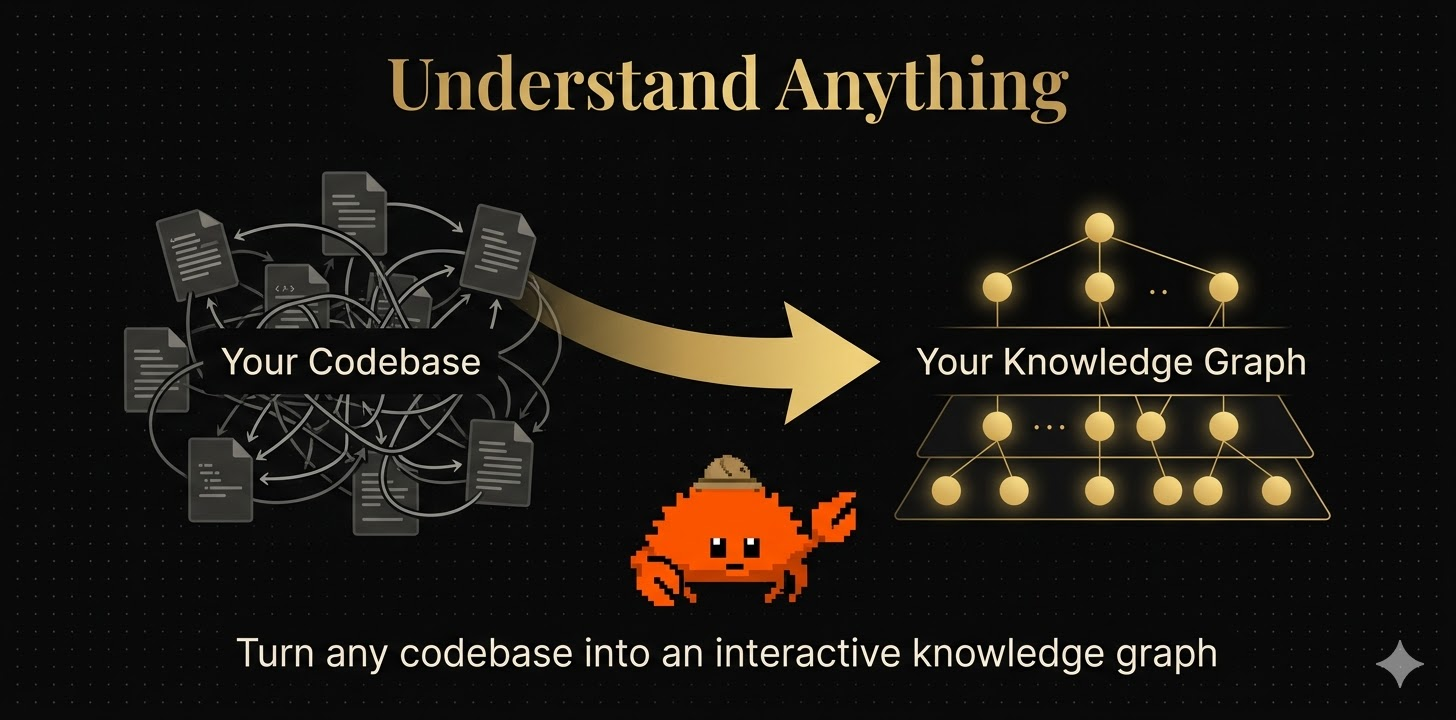
그림: 저장소 홈페이지의 hero 이미지를 PNG로 변환한 자료. “혼잡한 코드베이스 → 정리된 Knowledge Graph”라는 제품 비전을 압축해서 보여준다.
분석 범위
이 리포트는 README.md, 저장소 소스 트리, understand-anything-plugin 내부의 skill/agent 명세, package.json 계열 메타데이터, 홈페이지 자산, 공개 GitHub Discussions를 기준으로 작성했다. 별도의 공개 GitHub Wiki 페이지는 확인되지 않았고, 프로젝트 문서화의 중심은 README, 홈페이지, skill/agent markdown, Discussions에 있다.

Quick Links
| 구분 | 링크 | 비고 |
|---|---|---|
| GitHub 저장소 | https://github.com/Lum1104/Understand-Anything | 공식 소스, README, 설치 명령, Discussions |
| Homepage | https://understand-anything.com/ | 제품 소개와 데모 진입점 |
| Live Demo | https://understand-anything.com/demo/ | 브라우저에서 그래프 대시보드를 체험할 수 있는 데모 |
| Claude Code Plugin Reference | https://code.claude.com/docs/en/plugins-reference | Claude Code 플러그인 문맥 |
| Discord | https://discord.gg/pydat66RY | README/홈페이지에서 안내하는 커뮤니티 |
| Karpathy LLM Wiki 패턴 | https://gist.github.com/karpathy/442a6bf555914893e9891c11519de94f | /understand-knowledge가 겨냥하는 지식 베이스 패턴 |
| 논문 | 공개 논문 링크 없음 | 저장소와 공식 홈페이지 기준으로 별도 paper는 발견되지 않음 |
수집한 이미지와 문서 내 배치 매핑
| 로컬 파일 | 원본 위치 | 이 리포트에서 설명하는 기능 |
|---|---|---|
figures/홈페이지_히어로_개념도.png |
homepage/public/images/hero.jpg |
프로젝트의 핵심 비전: 코드베이스를 지식 그래프로 변환 |
figures/프로젝트_파이프라인_개요.png |
assets/hero.png |
분석 파이프라인과 결과 모드의 개념적 흐름 |
figures/인터랙티브_대시보드_구조_그래프.png |
assets/overview.png |
실제 대시보드의 노드·엣지·레이어 탐색 UI |
figures/구조_그래프_탐색_예시.png |
homepage/public/images/overview-structural.gif 대표 프레임 |
Structural view, 검색, tour 패널, 문서/파일 노드 탐색 |
figures/비즈니스_도메인_뷰_예시.png |
homepage/public/images/overview-domain.gif 대표 프레임 |
Domain view에서 도메인·플로우·비즈니스 단계 표시 |
figures/시스템_아키텍처_다이어그램.png |
리포트용 재구성 다이어그램 | README, skill 명세, 소스 구조를 종합한 런타임 아키텍처 |
figures/홈페이지_데모_대시보드.png |
homepage/public/images/overview.png |
홈페이지 데모에서 쓰이는 대시보드 화면 |
GIF 자산은 블로그용 Markdown 호환성과 이미지 경로 규칙을 맞추기 위해 대표 프레임을 .png로 변환했다.
Key Features
1. Structural Knowledge Graph: 코드 구조를 클릭 가능한 그래프로 변환
/understand 명령은 프로젝트 파일을 스캔하고, 파일·함수·클래스·모듈·설정·문서·인프라 리소스를 노드로 만든다.
노드 간 관계는 imports, calls, contains, configures, documents, tested_by 같은 edge로 연결된다.
결과는 .understand-anything/knowledge-graph.json에 저장되며, 대시보드에서 확대/축소, 검색, 필터링, 노드 상세 확인이 가능하다.
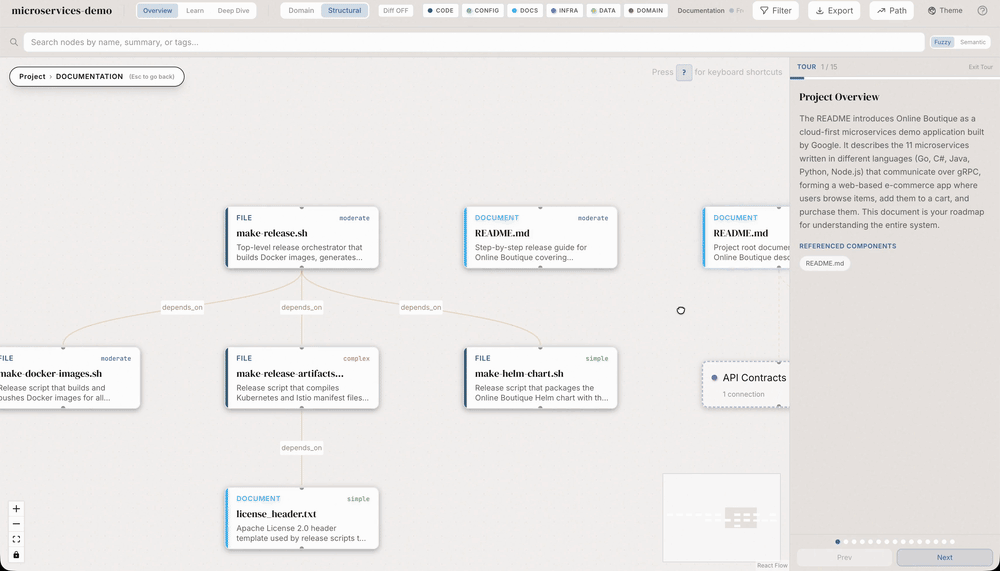
그림: Structural view의 예시. 문서와 파일 노드가 계층적으로 배치되고, 우측 tour 패널이 프로젝트 개요와 관련 컴포넌트를 단계적으로 안내한다.
2. Interactive Dashboard: 단순 정적 리포트가 아니라 탐색 가능한 UI
대시보드는 그래프를 시각적으로 표시하는 데서 멈추지 않는다.
노드 클릭 시 요약, 관계, 코드/문서 맥락을 보여주고, 레이어별 색상 구분과 검색 UI를 제공한다.
홈페이지 컴포넌트 기준으로는 hierarchical drill-down, fuzzy/semantic search, filtering, dependency path finder, PNG/SVG/filtered JSON export가 주요 UI 기능으로 정리되어 있다.

그림: 저장소 assets/overview.png의 대시보드 스크린샷. 중앙 그래프, 상단 검색/레이어 UI, 우측 상세 패널을 통해 “읽는 문서”가 아니라 “탐색하는 그래프”로 코드베이스를 소비하게 만든다.
3. Business Logic / Domain View: 코드 구조를 비즈니스 흐름으로 재해석
/understand-domain은 일반적인 import/call 그래프와 별개로 domain, flow, step 중심의 도메인 그래프를 만든다.
예를 들어 이커머스 코드베이스에서는 Recommendations & Ads, Shopping Assistant, Product Catalog, Checkout & Payment 같은 비즈니스 도메인을 추출하고, 도메인 간 cross-domain 관계와 플로우 단계를 보여줄 수 있다.
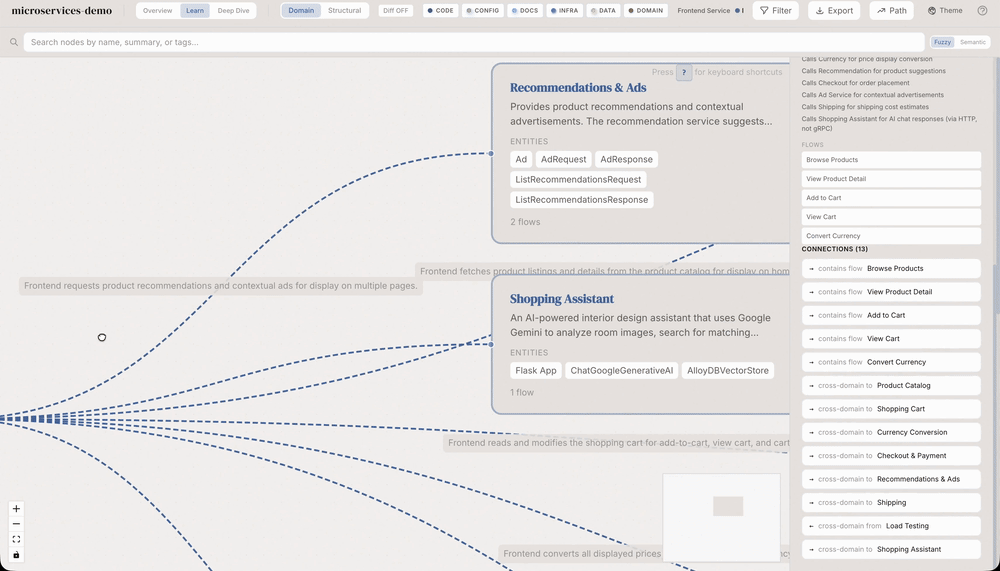
그림: Domain view 예시. 파일/함수 중심의 코드 그래프를 사용자가 이해하기 쉬운 도메인·플로우·업무 단계로 재배치한다. 의료 AI나 Bioinformatics처럼 도메인 지식이 코드 이해의 핵심인 프로젝트에서 특히 유용한 형태다.
4. Guided Tours: 신규 합류자를 위한 자동 온보딩 경로
README는 guided tour를 “아키텍처를 의존성 순서에 맞춰 설명하는 자동 walkthrough”로 설명한다.
skill 명세상 /understand의 Phase 5는 tour-builder 에이전트를 호출하고, README, entry point, 레이어, 노드, 엣지를 함께 제공해 tour 배열을 만든다.
각 tour step은 order, title, description, nodeIds를 포함하므로, 대시보드는 특정 단계에서 관련 노드를 하이라이트할 수 있다.
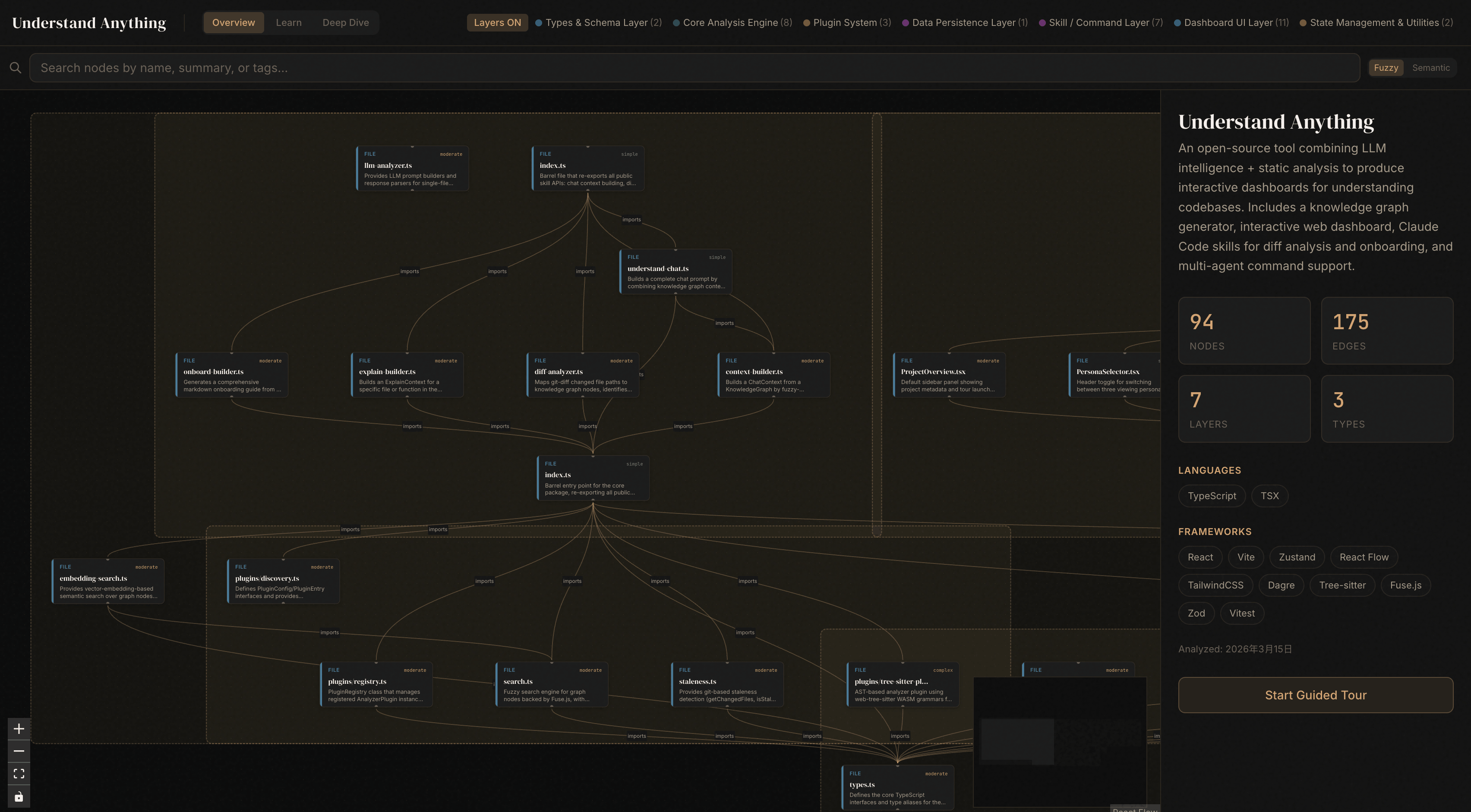
그림: 홈페이지 데모 대시보드의 구조 그래프 화면. Guided Tour는 대시보드 우측 패널에 연결되어 “무엇부터 읽어야 하는가”를 그래프 위에서 바로 안내한다.
5. Knowledge Base 분석: 코드뿐 아니라 LLM Wiki도 그래프화
/understand-knowledge는 Karpathy-style LLM Wiki를 대상으로 force-directed knowledge graph를 만든다.
결정적 parser가 index.md의 wikilink와 category를 추출하고, LLM 에이전트가 암시적 관계, entity, claim을 보완한다.
이는 코드 분석 도구가 아니라 “장기 지식 베이스 분석 도구”로 확장될 수 있는 지점이다.
6. Fuzzy & Semantic Search: 이름이 아니라 의미로 찾는 검색
대시보드는 노드 이름, 요약, 태그 기반 검색을 제공하며, README는 “which parts handle auth?” 같은 자연어 의미 검색도 지원한다고 설명한다.
코드베이스가 커질수록 단순 파일명 검색보다 “이 기능을 담당하는 부분”을 찾는 의미 검색이 중요해진다.
7. Diff Impact Analysis: 변경의 파급 범위 추정
/understand-diff는 변경된 파일을 그래프 노드에 매핑하고, 해당 노드와 1-hop 관계에 있는 영향을 받는 노드, edge, layer를 계산한다.
구현상 buildDiffContext는 changedFiles → changedNodes → affectedNodes → affectedLayers 순서로 영향 범위를 구성하고, 복잡도·레이어 횡단·넓은 blast radius 등을 risk assessment로 표현한다.
8. Incremental Update와 Graph Sharing
README 기준으로 .understand-anything/ 내부 graph JSON을 커밋하면 팀원이 재분석 없이 같은 그래프를 사용할 수 있다.
intermediate/와 diff-overlay.json은 로컬 scratch로 제외하고, 10MB 이상 큰 그래프는 git-lfs를 권장한다.
/understand --auto-update는 post-commit hook을 통해 변경분 중심으로 그래프를 최신화하는 용도로 제공된다.

그림: 저장소 assets/hero.png. 코드베이스를 scan, map, teach 단계로 정리하고, 결과를 guided tour, code structure, business logic, knowledge base 모드로 활용하는 제품 구조를 보여준다.
Tech Stack
버전은 저장소의 package.json 계열 파일 기준이다. 실제 설치 시점에는 lockfile과 최신 커밋에 따라 바뀔 수 있다.
| 계층 | 주요 기술 | 버전/근거 |
|---|---|---|
| Monorepo / package manager | pnpm workspace | root packageManager: pnpm@10.6.2 |
| Language | TypeScript | ^5.7.0 |
| Test | Vitest | root/plugin/core/dashboard에서 ^3.1.0 또는 coverage 3.2.4 사용 |
| Lint | ESLint, typescript-eslint | ESLint ^9.0.0, typescript-eslint ^8.0.0 |
| Core package | @understand-anything/core |
package version 0.1.0 |
| Skill package | @understand-anything/skill |
package version 2.7.5 |
| Parser / Static analysis | web-tree-sitter, tree-sitter-* grammars |
web-tree-sitter ^0.26.6, TypeScript/JS/Python/Go/Rust/Java/Ruby/PHP/C/C++/C# 계열 grammars |
| Schema validation | Zod | ^4.3.6 |
| Search | Fuse.js | ^7.1.0 |
| Graph processing | graphology, Louvain community detection | plugin: graphology ~0.26.0, dashboard: graphology ^0.25.4, Louvain ^2.0.x |
| Dashboard | React, Vite, XYFlow, D3 force, ELK, Dagre, Zustand | React ^19.0.0, Vite ^6.4.2, @xyflow/react ^12.0.0, d3-force ^3.0.0, elkjs ^0.9.3, @dagrejs/dagre ^2.0.4, Zustand ^5.0.0 |
| Styling | Tailwind CSS | dashboard dev dependency tailwindcss ^4.0.0, @tailwindcss/vite ^4.0.0 |
| Homepage | Astro | astro ^6.1.6, Node engine >=22.12.0 |
| Platform integration | Claude Code plugin, Cursor/Copilot manifests, installer scripts | .claude-plugin, .cursor-plugin, .copilot-plugin, install.sh, install.ps1 |
Architecture
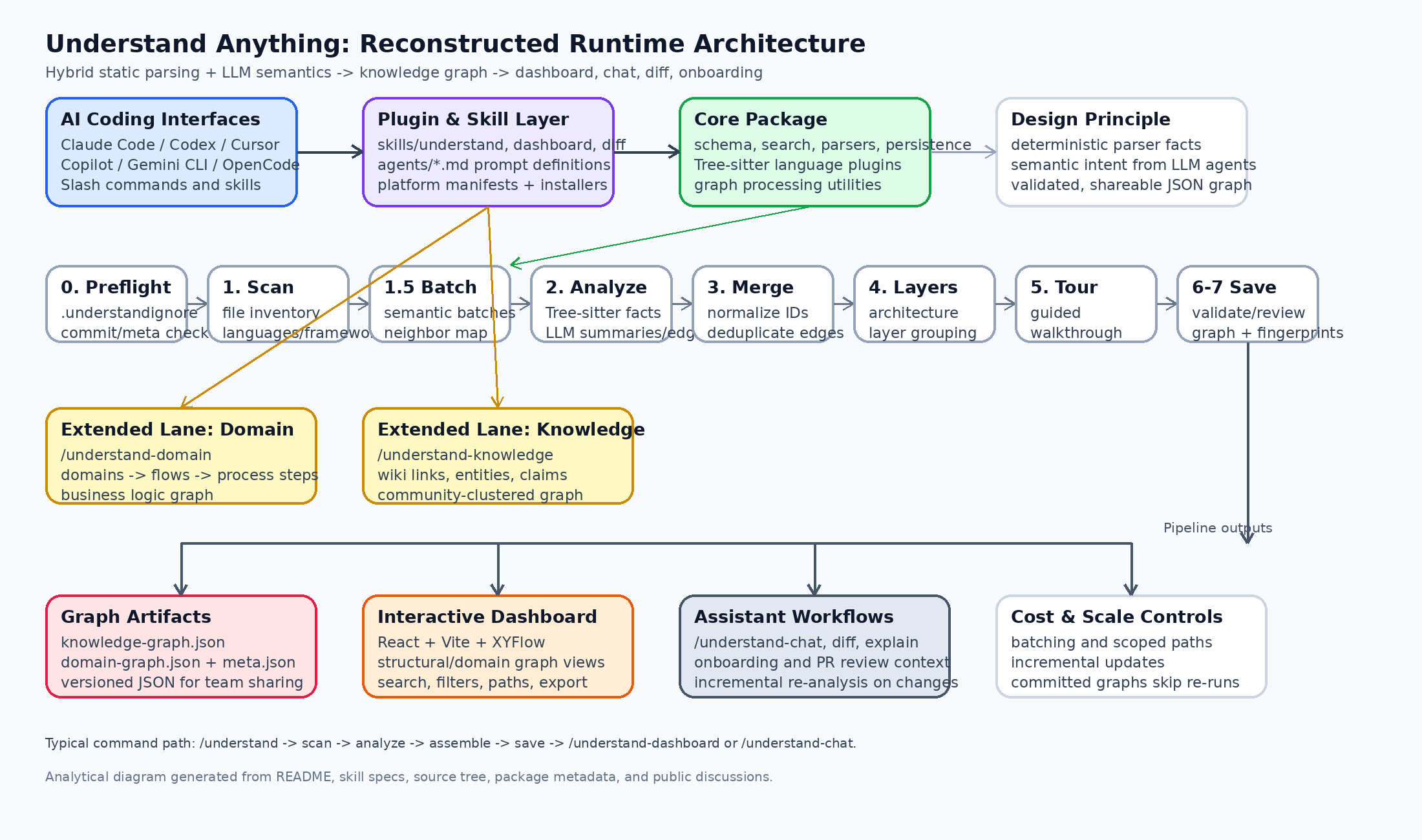
그림: README, skill 명세, 소스 구조, package metadata, Discussions를 종합해 재구성한 실행 아키텍처. 공식 아키텍처 다이어그램이 아니라 리포트용 분석 다이어그램이다.
1. Entry Layer: 여러 AI 코딩 환경에서 동일한 분석 명령 제공
저장소는 Claude Code, Codex, Cursor, Copilot, Gemini CLI, OpenCode 등 다양한 AI 코딩 환경을 대상으로 한다.
루트에는 .claude-plugin, .cursor-plugin, .copilot-plugin 같은 플랫폼별 메타데이터가 있고, install.sh/install.ps1는 각 환경에 맞는 symlink와 설치 경로를 구성한다.
핵심 사용자 명령은 다음 skill 디렉터리에 있다.
| Skill | 역할 |
|---|---|
understand |
코드베이스 분석 후 knowledge-graph.json 생성 |
understand-dashboard |
그래프 대시보드 실행 |
understand-chat |
생성된 그래프를 문맥으로 코드베이스 질의응답 |
understand-diff |
현재 변경 사항의 영향 범위 분석 |
understand-explain |
특정 파일/함수 deep-dive 설명 |
understand-onboard |
신규 팀원용 온보딩 가이드 생성 |
understand-domain |
비즈니스 도메인·flow·step 추출 |
understand-knowledge |
LLM Wiki/knowledge base를 그래프로 분석 |
2. Static + Semantic Hybrid: Tree-sitter와 LLM의 역할 분리
이 프로젝트의 설계상 핵심은 deterministic static analysis와 LLM semantic analysis의 분업이다.
- Tree-sitter / bundled scripts: imports, exports, function/class definitions, call sites, inheritance, importMap, structural fingerprint 등 반복 실행 시 재현 가능한 구조 정보를 담당한다.
- LLM agents: 파일 요약, 태그, 복잡도 판단, 아키텍처 레이어, 비즈니스 도메인 매핑, guided tour, 언어 개념 설명처럼 “코드가 무엇을 의미하는가”에 가까운 정보를 담당한다.
이 분업은 신뢰성 측면에서 중요하다.
구조적 사실은 deterministic parser로 고정하고, parser만으로는 알기 어려운 의도·도메인·학습 경로는 LLM에 맡긴다.
3. /understand의 7단계 파이프라인
understand-anything-plugin/skills/understand/SKILL.md 기준 실행 흐름은 다음과 같이 정리된다.
| Phase | 핵심 동작 | 산출물/의미 |
|---|---|---|
| 0. Pre-flight | 프로젝트 root 확인, worktree redirect, plugin build, commit/meta 확인 | 분석 대상과 incremental 여부 결정 |
| 0.5. Ignore Configuration | .understand-anything/.understandignore 생성/확인 |
분석 제외 패턴 관리 |
| 1. Scan | project-scanner가 파일·언어·프레임워크·importMap 파악 |
scan-result.json |
| 1.5. Batch | semantic batch와 neighbor map 계산 | batches.json |
| 2. Analyze | file-analyzer subagent를 최대 5개 병렬 실행 |
batch별 node/edge JSON |
| 3. Assemble Review | batch 결과 병합, 정규화, assemble review | assembled-graph.json 중간 결과 |
| 4. Architecture | architecture-analyzer가 architectural layer 생성 |
layers.json |
| 5. Tour | tour-builder가 guided tour 생성 |
tour.json |
| 6. Review | deterministic validation 또는 --review LLM reviewer |
review.json |
| 7. Save | 최종 graph, fingerprint, meta 저장 | .understand-anything/knowledge-graph.json |
4. Agent 구성
understand-anything-plugin/agents/에는 분석 태스크별 에이전트 프롬프트가 분리되어 있다.
| Agent | 역할 |
|---|---|
project-scanner |
파일 목록, 언어, 프레임워크, importMap, complexity 추정 |
file-analyzer |
파일 batch를 분석해 GraphNode/GraphEdge 생성 |
assemble-reviewer |
batch 병합 결과의 일관성 확인 |
architecture-analyzer |
레이어 구조 식별 |
tour-builder |
dependency-aware guided tour 생성 |
graph-reviewer |
graph completeness와 referential integrity 검증 |
domain-analyzer |
domain, flow, step 중심 비즈니스 그래프 생성 |
article-analyzer |
wiki article의 entity, claim, implicit relationship 추출 |
knowledge-graph-guide |
생성된 graph 사용법과 jq 질의 예시 안내 |
5. KnowledgeGraph 데이터 모델
문서와 agent guide에서 반복적으로 나타나는 top-level graph shape는 다음 구조다.
{
  "version": "1.0.0",
  "project": {
    "name": "...",
    "languages": ["..."],
    "frameworks": ["..."],
    "description": "...",
    "analyzedAt": "...",
    "gitCommitHash": "..."
  },
  "nodes": [],
  "edges": [],
  "layers": [],
  "tour": []
}
Node type은 code file, function, class, module뿐 아니라 config, document, service, table, endpoint, pipeline, schema, resource까지 포함한다.
Edge type은 structural, behavioral, data-flow, dependency, semantic, infrastructure, schema/data, domain, knowledge 관계를 포괄한다.
이 점이 일반적인 “코드 의존성 그래프”와 차별화되는 핵심이다.
6. Source Code Structure
| 경로 | 역할 |
|---|---|
understand-anything-plugin/skills/ |
slash-command별 실행 명세와 보조 스크립트 |
understand-anything-plugin/agents/ |
LLM subagent 프롬프트와 분석 계약 |
understand-anything-plugin/src/ |
chat, diff, explain, onboard 등 상위 기능 빌더 |
understand-anything-plugin/packages/core/src/ |
schema, type, parser plugin, search, persistence, fingerprint, staleness, analyzer logic |
understand-anything-plugin/packages/dashboard/src/ |
React/Vite 기반 시각화 UI |
homepage/ |
Astro 기반 공식 홈페이지와 demo/asset 구성 |
assets/ |
README/마케팅용 hero, overview 이미지 |
tests/skill/understand |
skill 동작 검증 관련 테스트 자산 |
Usage & Setup
Claude Code Native Plugin
/plugin marketplace add Lum1104/Understand-Anything
/plugin install understand-anything
코드베이스 분석:
/understand
한국어 콘텐츠로 그래프 설명, Dashboard UI label, guided tour를 생성하고 싶다면:
/understand --language ko
대시보드 실행:
/understand-dashboardMulti-platform one-line install
macOS / Linux:
curl -fsSL https://raw.githubusercontent.com/Lum1104/Understand-Anything/main/install.sh | bash

# 특정 플랫폼을 지정해 prompt를 건너뛰는 예시
curl -fsSL https://raw.githubusercontent.com/Lum1104/Understand-Anything/main/install.sh | bash -s codex
Windows PowerShell:
iwr -useb https://raw.githubusercontent.com/Lum1104/Understand-Anything/main/install.ps1 | iex
README 기준 지원 플랫폼 값은 gemini, codex, opencode, pi, openclaw, antigravity, vibe, vscode, hermes, cline, kimi, trae다.
분석 후 자주 쓰는 명령
# 코드베이스에 대해 질문
/understand-chat How does the payment flow work?

# 현재 변경 사항의 영향 분석
/understand-diff

# 특정 파일 또는 함수 deep dive
/understand-explain src/auth/login.ts

# 신규 팀원 온보딩 문서 생성
/understand-onboard

# 비즈니스 도메인 그래프 생성
/understand-domain

# Karpathy-pattern LLM Wiki 분석
/understand-knowledge ~/path/to/wiki

# post-commit hook 기반 자동 업데이트
/understand --auto-update

# 큰 monorepo에서 특정 하위 경로만 분석
/understand src/frontend
Local Development
git clone https://github.com/Lum1104/Understand-Anything.git
cd Understand-Anything
pnpm install
pnpm build

# dashboard 개발 서버
pnpm dev:dashboard

# core package test
pnpm --filter @understand-anything/core test
팀 공유 방식
최종 graph는 .understand-anything/knowledge-graph.json에 저장된다.
팀 차원에서 같은 그래프를 재사용하려면 .understand-anything/을 커밋하되, intermediate/와 diff-overlay.json은 제외하는 구성이 적절하다.
.understand-anything/intermediate/
.understand-anything/diff-overlay.json
큰 그래프는 git-lfs 추적 대상으로 분리하는 것이 좋다.
git lfs install
git lfs track ".understand-anything/*.json"
git add .gitattributes .understand-anything/
Performance / Cost 관점
공개 Discussion의 maintainer 답변에 따르면 full /understand 실행 비용은 주로 Phase 2 file-analyzer가 좌우한다.
파일은 대략 25개 단위 batch로 묶이고 최대 5개 subagent가 병렬 실행되며, 전체 소스 라인 수에 거의 선형으로 비용이 증가하는 구조다.
100개 이상의 파일에서는 subdirectory scope를 권장하는 gate가 걸린다.
Incremental update는 변경 파일 중심으로 Phase 2를 다시 수행하지만, architecture/tour처럼 전체 그래프를 재해석해야 하는 단계는 full merged graph를 다시 본다.
따라서 이 프로젝트를 큰 monorepo에서 운영하려면 다음 전략이 현실적이다.
- 초기 분석은 하위 도메인별로 scope를 나눈다.
.understandignore로 generated, fixture, binary, vendored code를 적극 제외한다.- 안정화된 graph JSON은 저장소에 커밋하거나 원격 캐시/registry로 공유한다.
- 리뷰나 온보딩 직전에는
/understand-diff로 blast radius를 확인한다.
Personal Insights
의료 AI 관점
의료 AI 시스템은 단순 모델 코드보다 데이터 수집, 전처리, cohort 정의, 모델 inference, validation, reporting, audit logging이 더 중요할 때가 많다.
Understand Anything은 이런 pipeline을 file/function 중심이 아니라 domain flow와 graph artifact로 바꿀 수 있다는 점에서 유용하다.
예를 들어 병원 EMR adapter, feature extraction, model serving, clinical decision support UI, alerting rule, monitoring dashboard가 서로 어떤 edge로 연결되는지 시각화하면, 신규 연구원이나 MLOps 엔지니어가 시스템 위험 지점을 더 빨리 파악할 수 있다.
특히 /understand-diff는 “이번 PR이 clinical alert threshold, cohort definition, reporting logic에 영향을 주는가?” 같은 질문에 맞는 출발점을 제공한다.
단, 실제 의료 환경에서 사용하려면 PHI/PII가 source, test fixture, docs, prompt context에 들어가지 않도록 .understandignore, 로컬 실행 정책, 로그 보존 정책을 명확히 해야 한다.
이 도구는 규제 검증이나 임상 안전성 검토를 대체하지 않고, 코드 이해와 감사 추적의 보조 레이어로 보는 것이 적절하다.
Bioinformatics 관점
Bioinformatics 프로젝트는 Python/R/Nextflow/Snakemake/Shell/SQL/Markdown이 섞인 경우가 많고, 분석 코드와 실험 노트가 분리되어 있지 않은 경우도 흔하다.
Understand Anything의 장점은 code, docs, config, data schema, pipeline file을 같은 그래프에 올릴 수 있다는 점이다.
Variant calling, QC, alignment, annotation, report generation처럼 단계가 긴 pipeline에서는 pipeline, schema, table, document node type이 중요하다.
여기에 domain graph를 결합하면 “샘플이 어떤 단계에서 어떤 reference/resource를 사용했고, 어떤 결과 table과 report로 이어지는가”를 더 잘 설명할 수 있다.
Bioinformatics에서는 함수 호출 관계보다 provenance와 data-flow가 중요하므로, reads_from, writes_to, transforms, validates, documents edge를 얼마나 충실히 추출하느냐가 핵심 품질 지표가 될 것이다.
향후 확장 아이디어는 ontology-aware graph enrichment다.
Gene Ontology, disease ontology, assay type, sample metadata schema를 external knowledge source로 연결하면 단순 코드 그래프가 연구 지식 그래프로 확장될 수 있다.
Autonomous Agent 개발 관점
Autonomous coding agent에게 가장 큰 병목은 “현재 repository context를 어떻게 장기 기억으로 유지할 것인가”다.
Understand Anything의 knowledge-graph.json은 agent-native memory artifact로 활용하기 좋다.
에이전트가 매번 전체 코드를 읽는 대신, graph에서 관련 node, edge, layer, tour step을 검색하고 필요한 파일만 deep dive하는 구조를 만들 수 있다.
특히 다음 세 가지가 agent workflow에 직접적인 가치를 준다.
- Planning: 변경 목표와 관련된 node/layer를 먼저 찾고 작업 범위를 제한한다.
- Risk Analysis:
/understand-diff로 affected components와 cross-layer impact를 확인한다. - Handoff Memory: graph JSON과 tour를 저장소에 남기면 다음 agent session이 같은 project map을 재사용한다.
공개 Discussion에서도 knowledge-graph.json을 LLM-Wiki나 static site로 넘기는 interoperability 아이디어가 논의되었다. 이 방향은 중요하다.
그래프가 단일 도구 내부 자산이 아니라 schemaVersion과 JSON Schema가 있는 안정적인 exchange artifact가 되면, 코드 이해, 문서화, agent memory, PR review, onboarding이 같은 데이터 레이어를 공유할 수 있다.
기술적 평가
강점
- 코드·문서·인프라·데이터 스키마를 하나의 graph model로 묶으려는 범위가 넓다.
- deterministic parser와 LLM semantic layer를 분리해 재현성과 설명력을 동시에 노린다.
- skill/agent 명세가 markdown으로 공개되어 있어 pipeline reasoning을 추적하기 쉽다.
- dashboard가 단순 시각화가 아니라 tour, search, filtering, path, export와 연결된다.
- graph JSON을 커밋 가능한 artifact로 취급해 팀 공유와 agent memory 확장이 가능하다.
리스크와 개선 여지
- LLM이 생성하는 semantic edge, summary, domain mapping은 hallucination 가능성이 있으므로 reviewer와 validation이 중요하다.
- 대형 monorepo에서는 token cost와 분석 시간이 빠르게 커질 수 있다.
- schemaVersion, JSON Schema, external graph registry가 더 안정화되면 downstream ecosystem이 커질 수 있다.
- 의료·바이오처럼 민감 데이터가 있는 분야에서는 prompt context와 생성 artifact의 보안 정책이 선행되어야 한다.
- Domain graph 품질은 코드 구조만으로 충분하지 않을 수 있으므로 도메인 문서, README, ADR, runbook과 함께 분석하는 것이 좋다.
결론
Understand Anything은 “그래프를 예쁘게 보여주는 도구”라기보다 “AI coding agent가 코드베이스를 가르치고 기억하게 만드는 중간 표현”에 가깝다.
README의 슬로건처럼 복잡함을 과시하는 그래프가 아니라, 신규 개발자와 에이전트가 실제로 길을 찾게 만드는 graph를 목표로 한다.
의료 AI와 Bioinformatics처럼 코드, 도메인 지식, 데이터 흐름, 문서가 얽힌 프로젝트에서는 특히 가치가 크다.
다만 민감 데이터 통제, schema 안정화, cost telemetry, remote graph sharing이 성숙해질수록 실무 적용성이 더 높아질 것이다.
참고한 주요 파일과 공개 자료
'AI 생성 글 정리 > tech_github' 카테고리의 다른 글
| OpenHarness — 에이전트에게 손, 눈, 기억, 권한을 붙이는 오픈소스 Agent Harness (1) | 2026.05.29 |
|---|---|
| MarkItDown — LLM을 위한 범용 파일→Markdown 변환 엔진 (2) | 2026.05.27 |
| llmfit — 로컬 하드웨어에서 “실제로 잘 도는” LLM을 찾아주는 Rust 기반 모델 피팅 도구 (0) | 2026.05.27 |
| K9s: Kubernetes 운영을 터미널에서 빠르게 탐색·관찰·조작하는 TUI (0) | 2026.05.27 |
| CodeGraph — AI 코딩 에이전트를 위한 로컬 코드 지식 그래프 (0) | 2026.05.27 |


